Appointment & Booking Software for Hair Salons
Streamline appointment booking, manage stylists, and reduce no-shows with a salon reservation system designed specifically for hairdressing businesses.
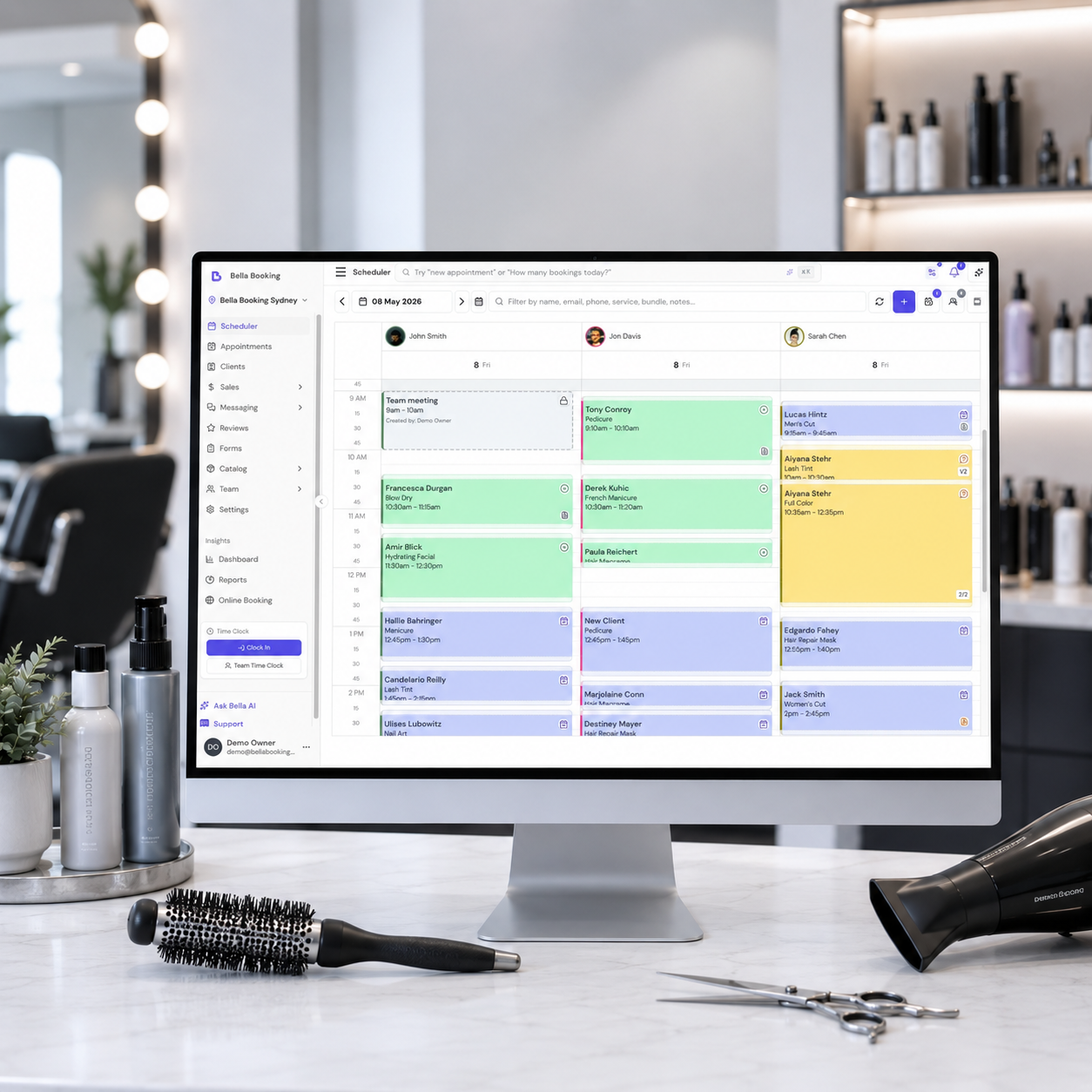
Bella Booking is hair salon software built for the complexity of modern hairdressing. Manage colour processing times where your stylist is freed up for quick services while colour develops, book multi-service appointments with precise timing, and let clients choose their preferred stylist when booking online. The platform handles everything salons need day-to-day: deposits and cancellation policies that protect your revenue, colour formula tracking and service history per client, pricing tiers from junior to master stylists, and service bundles for cut-and-colour combos with visible savings. Automated SMS reminders reduce no-shows, while 32 reports cover stylist utilisation, sales, cancellations, and client retention. Additional tools include two-way SMS messaging with a dedicated phone number, digital tipping, Afterpay, gift cards, a loyalty programme, recurring memberships, prepaid session packages, AI-powered business insights with a weekly performance digest, and schedule optimisation that minimises gaps between appointments.
What owners say
From businesses like yours
“User-friendly and reliable booking system with quick support”
“Great support for small business”
Common Challenges
Challenges hair salon businesses face
Colour processing time management
Hair colour services require processing time where the client stays but the stylist is free. Without software that understands this, you lose bookable slots or double-book accidentally.
Stylist preference and rebooking
Clients want their preferred stylist, but managing these preferences manually leads to scheduling conflicts, long wait times, and lost rebooking opportunities.
Complex multi-service appointments
Cut + colour + treatment combinations need precise time calculations. Getting this wrong means overlapping appointments, rushed services, or wasted gaps in the schedule.
No-shows on high-value colour appointments
A missed colour appointment can cost hundreds of dollars in lost revenue and wasted product. Without deposits and automated reminders, no-shows eat into your bottom line.
Rostering across experience levels and shifts
Hair salons run a mix of full-time seniors, part-time juniors, and weekend casuals. Building rosters that match demand patterns while respecting each stylist's availability and skill level is a weekly headache without centralised scheduling.
Features
Tools for your hair salon business
Designed to address the specific needs of hair salon businesses.
24/7 Online booking
- Let clients book appointments anytime through your branded booking page. Accept bookings outside business hours and reduce phone interruptions.
Pricing Tiers for Stylists
- Create Junior, Senior, and Master pricing tiers. Charge appropriately for experience levels while offering budget-friendly options.
Deposits & No-Show Protection
- Collect deposits during booking, set cancellation policies, and process automatic refunds. Protect your revenue from last-minute cancellations.
Client History & Colour Formulas
- Keep detailed records of client preferences, colour formulas, and previous services. Attach before/after photos for personalised experiences.
Automated Reminders & Confirmations
- SMS and email reminders with one-click confirmation links. Customise templates with client names, services, and appointment details.
Service Bundles & Combos
- Create package deals (cut + colour + treatment) with flexible pricing - set a total price, apply a discount percentage, or offer bundles for free. Show savings to clients during online booking. Run services back-to-back or simultaneously with multiple stylists.
Team Utilisation Reports
- Track stylist performance, booking rates, and revenue. 32 detailed reports including sales, cancellations, and utilisation metrics.
Digital Tipping
- Let clients tip their stylists after appointments via your online booking portal. Tips are processed securely through Stripe, with automatic notifications to you and the team member.
Prepaid Packages
- Sell session bundles upfront so clients can purchase multiple appointments at a discounted rate. Packages can be purchased online and redeemed at the salon.
Digital Forms & Consent
- Create custom intake forms, consent forms, and health questionnaires with electronic signatures. Auto-send forms to clients before their appointment for a seamless check-in experience.
Multi-Location Support
- Manage multiple salon locations from one account.
Chair & Wash Basin Management
- Track styling chairs, wash basins, and shared equipment. Set capacity for wash stations (e.g., 3 basins = capacity 3). Auto-assign for online bookings.
Two-Way SMS Messaging
- A dedicated phone number for your business. Send and receive messages, auto-confirm from client replies, and send SMS and email campaigns for promotions.
AI Business Insights
- Weekly AI digest analyses your performance and recommends actions. Ask the AI assistant anything about your schedule, clients, or revenue.
Afterpay / Buy Now Pay Later
- Clients pay in 4 interest-free instalments for deposits, gift cards, and packages. You receive the full amount upfront.
Schedule Optimisation
- Three modes for online booking - Show All, Reduce Gaps, or Eliminate Gaps. Minimise dead time between appointments.
Gift cards
- Sell digital gift cards online - amount-based or service-based. Clients view balances and redeem when booking online.
Loyalty programme
- Reward repeat clients with points-based loyalty. Customise earning rules, set rewards, and track engagement.
Memberships
- Create recurring membership plans - monthly blowdry passes, unlimited colour touch-ups, or discounted styling packages. Automatic Stripe billing with 9+ frequency options. Clients purchase online and track their membership through the My Membership portal.
Client Reviews
- Collect verified reviews after appointments with AI moderation. Reviews display on your booking page with star ratings.
How We Compare
Bella Booking vs popular hair salon software
Feature-by-feature comparison of the tools that matter most for hair salon businesses.
| Feature | Bella | Fresha | Kitomba | Timely | Vagaro | Phorest |
|---|---|---|---|---|---|---|
| Colour processing time | Included in Bella Booking. Bookable gap during processing. | Partial or add-on in Fresha. Basic gap between services. | Partial or add-on in Kitomba. Basic gap between services. | Partial or add-on in Timely. Basic gap support. | Partial or add-on in Vagaro. Basic gap support. | Partial or add-on in Phorest. Basic gap support. |
| Buffer time before/after | Included in Bella Booking. Configurable per service. | Not available in Fresha. | Not available in Kitomba. | Partial or add-on in Timely. Limited support. | Partial or add-on in Vagaro. Limited support. | Partial or add-on in Phorest. Limited support. |
| Service add-ons | Included in Bella Booking. Per-service add-ons with pricing. | Included in Fresha. | Partial or add-on in Kitomba. Required follow-on services only. | Included in Timely. | Included in Vagaro. Per service with categories. | Partial or add-on in Phorest. Custom fees, no per-service extras. |
| Deposits & no-show protection | Included in Bella Booking. Fixed or percentage, per-service overrides. | Included in Fresha. | Included in Kitomba. | Included in Timely. | Included in Vagaro. | Included in Phorest. Credit card secured bookings. |
| SMS reminders included | Included in Bella Booking. 50-500/month included. | Included in Fresha. 20 free, then extra charge. | Included in Kitomba. Extra cost per message. | Included in Timely. Included per staff (100-350/staff). | Included in Vagaro. | Included in Phorest. 12c or 8.5c per message. |
| Waitlist management | Included in Bella Booking. Automatic slot matching. | Included in Fresha. | Not available in Kitomba. | Included in Timely. | Included in Vagaro. | Included in Phorest. |
| Schedule optimisation | Included in Bella Booking. 3 modes for online booking. | Included in Fresha. 3 modes. | Partial or add-on in Kitomba. Drag-and-drop only. | Included in Timely. Minimise Gaps mode. | Included in Vagaro. Minimise Gaps setting. | Included in Phorest. Smart Booking. |
| Digital forms & consent | Included in Bella Booking. All plans, e-signatures. | Included in Fresha. | Partial or add-on in Kitomba. Platinum/Diamond plans only. | Partial or add-on in Timely. Elevate plan and up. | Partial or add-on in Vagaro. A$15/month add-on. | Included in Phorest. |
| Recurring memberships | Included in Bella Booking. 9 billing cycles, client self-service. | Partial or add-on in Fresha. No client self-service portal. | Partial or add-on in Kitomba. Via third-party Salon Pay. | Not available in Timely. | Included in Vagaro. 9 billing frequencies. | Partial or add-on in Phorest. Add-on cost. |
| Digital tipping | Included in Bella Booking. | Included in Fresha. In person and after the appointment. | Not available in Kitomba. | Partial or add-on in Timely. In person, on a TimelyPay terminal or Tap to Pay. | Included in Vagaro. At checkout. | Included in Phorest. PhorestTips on the card terminal. |
| Abandoned booking recovery | Included in Bella Booking. Captures drafts, SMS/email follow-up. | Not available in Fresha. | Not available in Kitomba. | Partial or add-on in Timely. Tracks status, no automation. | Not available in Vagaro. | Partial or add-on in Phorest. Email-only reminder. |
| AI assistant | Included in Bella Booking. Business insights and recommendations. | Not available in Fresha. No owner assistant. AI Concierge add-on answers client calls and messages. | Not available in Kitomba. | Not available in Timely. | Included in Vagaro. Vera answers questions on your data. Vera Receptionist add-on answers client chats and texts. | Not available in Phorest. Insights AI listed as coming later this year. Front Desk AI add-on answers client texts. |
Feature data verified from official competitor websites.
Streamline Your Salon Operations
Bella Booking helps hair salons optimise appointment scheduling, protect revenue with deposits and cancellation policies, and deliver personalised service with detailed client records. Our pricing tiers let you charge appropriately for stylist experience levels.
A typical hair salon with 6 stylists pays just A$99/month on the Professional plan.
See full pricing
Learn More
Guides & tips for hair salon owners
How processing time works for colour services
Set up bookable gaps during colour processing to maximise stylist utilisation.
Refer-a-friend for salons
Unique client links and fixed-amount rewards when a friend’s first paid appointment is checked out.
Client credit wallet
One prepaid balance per client with optional top-up bonuses - applied at the till.
Online booking system for hairdressers
What to look for in a booking system built for hairdressing businesses.
Can multiple stylists work on the same appointment?
How parallel appointments work for complex hair services.
How to reduce salon admin with AI
Use AI insights to automate reporting and spot trends.
Salon software comparison Australia
Side-by-side comparison of the top salon software platforms in Australia.
How to set up salon memberships
Create recurring membership plans for colour touch-ups and styling packages.
Booth rental vs employment
Compare business models: hiring staff vs renting chairs to independent stylists.
How to retain salon clients
Practical strategies to keep clients rebooking without aggressive sales tactics.
Building client loyalty
A guide to client notes, rebooking, service recovery, and identifying at-risk clients.
Managing staff schedules
Set up rosters, handle time off, and balance coverage across your team.
Beauty salon booking and management
Multi-service scheduling for beauty salons with specialist matching and service bundles.
Barbershop scheduling software
Walk-in and pre-booked appointment scheduling for barbershops, with barber preference selection and deposits to protect against no-shows.
FAQ
Frequently asked questions
Can clients book multiple services in one appointment?
Yes. Clients can book multiple services in a single appointment. The system calculates the total time required and shows only available slots that can accommodate the full service duration.
How do pricing tiers work for different stylists?
Create pricing tiers (e.g., Junior, Senior, Master) and assign different prices for the same service based on stylist experience level. Clients see the appropriate price based on which stylist they select during booking.
How do deposits and cancellation policies work?
On all plans, require deposits (fixed amount or percentage) when clients book online. Set cancellation periods and fees. If clients cancel with less than the required notice, fees are calculated and refunds processed automatically via Stripe.
Can I store colour formulas and client notes?
Yes. Store detailed client notes including colour formulas, preferences, and treatment history. Attach documents like consent forms and before/after photos to client profiles.
How do automated reminders work?
Configure SMS and email reminders to be sent before appointments (e.g., 24 hours and 2 hours before). Templates are customisable with variables like client name, date, time, and services. Include one-click confirmation links to reduce no-shows.
Can clients choose their preferred stylist when booking online?
Yes, if you enable this option. Clients can view stylist availability and book directly with their preferred professional. You can also disable this and assign stylists yourself.
What reports are available?
32 reports, including Appointments summary, Service bookings, Cancellations, Sales summary, Payments, Service & product sales, Service sales, Product sales, Team member sales, Team Member Utilisation, Team Member Days off, Client retention, Booking source, Gift cards, Loyalty, Discount summary, and Attendance. All support date filtering and CSV export.
Is there a waitlist feature?
Yes. When your schedule is full, clients can join a waitlist with their preferred times and services. When cancellations open slots, you can convert waitlist entries to appointments.
What happens if a client starts booking online but doesn't finish?
Bella Booking captures incomplete bookings automatically - a rare feature in salon software. When a signed-in client adds a service online and leaves without confirming, their selection is saved as a draft, marked with the step they stopped at. You see the count on a dashboard card and the full list in the Waitlist panel, on its Incomplete bookings tab. Enable the automatic reminder and a client who reached the Review step gets an SMS or email with a one-tap resume link. Most booking systems don't recover these abandoned bookings at all - compare on our comparison pages.
Can clients pay with Afterpay?
Yes. When Afterpay (or Clearpay in the UK) is enabled, clients can split payments into 4 interest-free instalments for deposits, gift card purchases, and package purchases. You receive the full amount upfront. Available in Australia, New Zealand, United States, Canada, and the United Kingdom.
Is there a messaging feature for client communication?
Yes - the optional Messages Plus add-on gives your business a dedicated phone number with a two-way SMS inbox. Clients can reply to appointment reminders to confirm, and you can send SMS and email campaigns for promotions and announcements. Automated messages (reminders, confirmations) are included on all plans.
Does Bella Booking use AI?
Yes. Bella AI is an assistant you can ask anything about your business - schedules, clients, revenue, team performance. A weekly AI business digest analyses your data and sends a personalised performance summary with actionable insights to your email. With Messages Plus, Bella also drafts your marketing-campaign emails from a one-sentence brief and checks every campaign for deliverability before it sends.
Can Bella help me write a campaign?
Yes. With Messages Plus, describe your email in a sentence and Bella drafts a subject and body - grounded in your salon's own description. It is a first draft you edit and make your own, never auto-sent. Before any campaign goes out, Bella checks it: SMS against anti-spam rules and email for spam-trigger words and deliverability, so your promotion lands in the inbox rather than the spam folder. Serious problems are flagged to fix; smaller ones appear as warnings.
How do memberships work for hair salons?
Create recurring subscription plans - for example, a monthly blowdry membership or unlimited colour touch-ups at a flat rate. Billing is handled automatically through Stripe with 9+ frequency options from weekly to annually. Clients purchase memberships through your online booking page and view plan details, track included sessions, and check their next billing date through the My Membership portal.
Can I collect client reviews?
Yes. On the Professional plan, clients who completed an appointment can leave a verified review with star ratings and optional written feedback. AI moderation checks reviews before publishing, and you can respond publicly. Reviews appear on your online booking page.
Can clients leave tips for their stylist?
Yes. When digital tipping is enabled, clients can leave tips for their stylist after appointments via your online booking portal. Tips are processed through Stripe and both you and the team member are notified. Tipping is part of the review-and-tip flow, which comes with client reviews - a Professional-plan feature.
How does processing time work for colour services?
When you configure a colour service, you can set a processing time where the colour develops. During processing, the stylist is freed up in the schedule to take a quick blowdry, fringe trim, or other short service. The client remains in the chair, but the stylist's calendar shows available slots - maximising your chair utilisation without double-booking.
Is Bella Booking suitable for Australian hair salons?
Yes. Bella Booking is Australian-headquartered with pricing in AUD (GST included), Australian Stripe payment processing at domestic rates (1.65% + 30c, plus Bella's 1% platform fee - 2.65% + 30c all-in), SMS sent through Australian carriers for reliable delivery, and responsive support across multiple timezones. Your subscription is billed in AUD, so there are no foreign-exchange surprises.
How does colour formula tracking work across multiple visits?
Every client profile has a detailed notes section where you can record colour formulas, mixing ratios, developer volumes, and processing times used at each visit. Notes are organised with three visibility tiers - client-level notes that persist across all appointments (ideal for base formulas and allergies), appointment-level notes for one-off adjustments, and notes visible in both contexts. When a client returns, the stylist sees their full colour history before the appointment starts. You can also attach before-and-after photos to each appointment for visual reference. This means a different stylist can pick up where the last one left off, and you never lose a formula when a team member leaves.
How do I manage stylist rosters and shift patterns?
Each team member has default working hours that repeat weekly - set their regular days and start/finish times once. For variations like alternating Saturdays or seasonal hours, use custom working hours to override specific dates without changing the default pattern. Time off (annual leave, sick days, personal leave) is managed separately and automatically blocks bookings for those dates. The team schedule view shows everyone's roster in a grid layout so you can spot coverage gaps at a glance. Online booking respects all of these settings - clients only see slots when their preferred stylist is actually working. Pair this with the Peak hours report to align your roster with actual demand patterns rather than guesswork.
How do multi-service colour appointments handle timing?
A typical colour-and-cut appointment involves multiple stages with different timing requirements. When you set up a colour service, you configure the active application time plus a processing time - during processing, the stylist is freed up in the schedule to take a quick blowdry or fringe trim while the colour develops. The client stays in the chair (blocking the resource) but the stylist's calendar shows available slots. For cut-and-colour bundles, you can set the service order and add processing time between steps. Buffer time before and after the appointment handles setup and cleanup. The system calculates the total duration accurately, so when clients book a bundle online, they only see slots where the full sequence - application, processing, cut, finish - fits without overlap.
Explore Features
Everything you need to run your hair salon
Ready to improve your hair salon business?
See how Bella Booking can help you manage your hair salon business more efficiently.
Australian-owned business. Sydney-based team, with responsive support across multiple timezones.
Hair Salon Software Built in Australia
Bella Booking is built by a Sydney-based team and designed for the way salons work locally. Manage stylist schedules, track appointments, and reduce no-shows with AUD pricing and GST-inclusive reporting out of the box.